HTML5 and SharePoint 2010
Are you excited? Have you been hearing this buzz word (HTML5) for a long time but couldn't muster enough confidence or energy to venture into it.

Are you excited? Have you been hearing this buzz word (HTML5) for a long time but couldn't muster enough confidence or energy to venture into it.

Read Part 1: HTML5 and SharePoint 2010 With the help of Javascript programming, you can create your own controls to control the video. This means you can create your own video player, apply different styles to it,...
In this tutorial I’ll show you how to install AJAX Control toolkit step by step: You can download AJAX Toolkit .NET 4 “Apr 12 2010” released before 4 days, from...
topic source MSDN PowerPivot for SharePoint supports Excel 2010 workbooks that contain PowerPivot data and that are published to a SharePoint site. As a result, other users who do not have the PowerPivot add-in...

Microsoft Biggest Developer Conference will be on 14th and15th of May 2012. The event will feature Ali Faramawy, the Corporate Vice President of Microsoft International
As it seems a little bit confused on how you can manage your SharePoint on Office 365, here is an how to First, connect to the Office 365 portal and click on the Admin link shown at the top
SharePoint 2010: Leveraging HTML5 Objects in SharePoint SharePoint 2010: Creating Document Sets Programmatically SharePoint 2010: Programmatically Finding Tagged Items SharePoint 2010: Developing AJAX-Enabled Web...
اكتشاف الاسبوع الماضي اثنين من شاشات شيربوينت Sharepoint 2013 وزادت بالتأكيد الكثير من الاهتمام بالنسبة لى لمعرفة اهم مميزات الاصدارة الجديدة من الشير بيونت ووجت من اهم المميزات اللى ستكون فى الاصدارة الجديدة هى...

Project source : http://skydriveconnector.codeplex.com/# Project Description SkyDrive Connector for SharePoint is a sandbox web part that can help manage documents stored on SkyDrive on SharePoint by adding...
I had a difficult time to get user profile service synchronization started. Following are the errors encountered to me when I tried to start the synchronization manually as well as through SharePoint.
There can be many problems which can cause to this issue, I will explain few which i found and how i address. here though i delete and recreate the user profile service application the synchronization still stuck in...

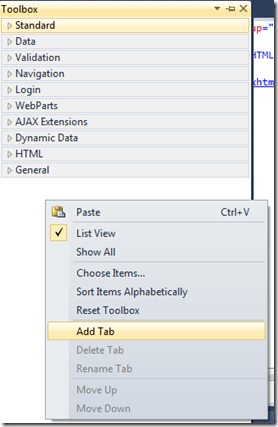
We can view the controls that are available by opening up the Toolbox task pane and maximizing the ASP.NET Controls option. Within this option, there are six categories of controls.